Two days ago I wrote about putting a Zigbee temperature sensor in every room and finding out that my house is not one temperature. The back bedroom sat around 62 while the hall thermostat proudly reported 68. Graphs are nice, but a graph does not warm a kid’s bedroom.
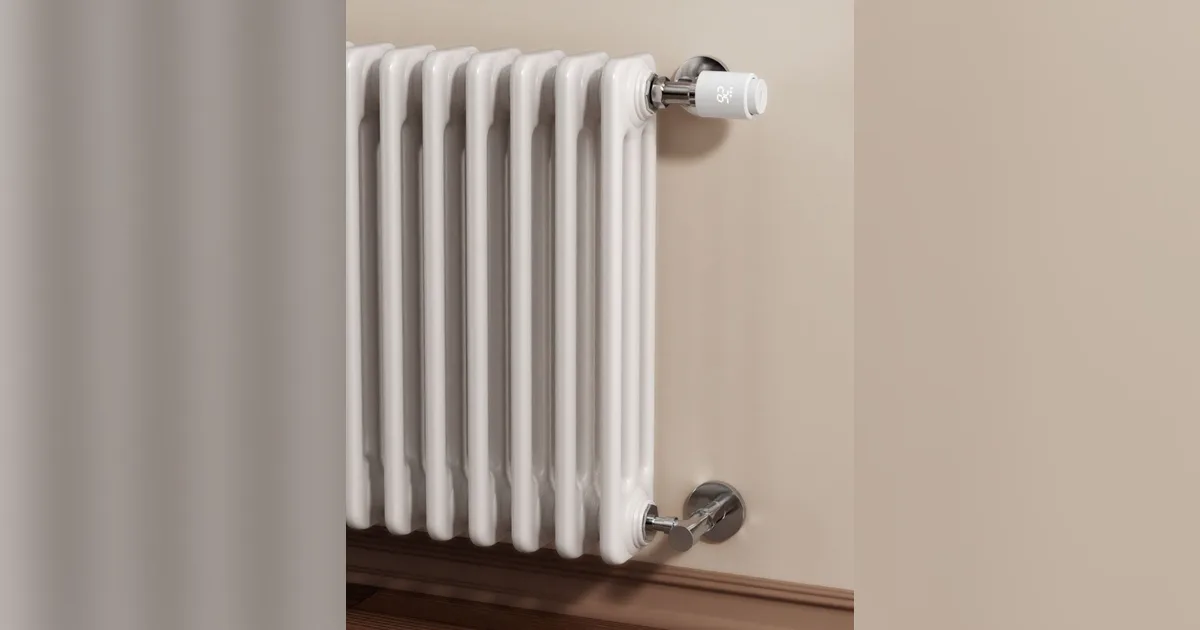
The fix for a hot water radiator house is old technology with a new brain: a thermostatic radiator valve on each radiator, so every room throttles its own heat. I put SONOFF TRVZB Zigbee valves on the radiators that matter, fed them the room sensors I already had, and let Home Assistant run per-room schedules. The coldest bedroom now tracks within a degree of its target, and the overheated kitchen stopped cooking us at dinner.
This is the build log: the hardware, the very American plumbing problem nobody warns you about, the Zigbee2MQTT and ZHA setup, and the automations I actually kept. If you are still building your network, start with my best Zigbee devices for Home Assistant guide first. TRVs are battery devices that lean hard on a healthy mesh.
How a radiator valve actually fixes a cold room
A hot water system has one thermostat that turns the boiler on and off. Every radiator on the loop gets hot water whenever the boiler runs, so rooms near the boiler, rooms with oversized radiators, and rooms with sun or an oven all overshoot while the far bedroom never catches up.
A thermostatic radiator valve sits between the supply pipe and the radiator and closes as its room approaches its target. Classic TRVs do this with a wax capsule and a numbered dial. A smart TRV replaces the wax head with a small motor, a temperature sensor, and a radio, so you can set an exact target, run schedules, and, crucially, tell it what the room temperature really is.
The trick that makes this work in my house is counterintuitive: you turn the main thermostat up a little, not down. The hall thermostat becomes the “call for heat” switch, set a degree or two above where it used to be. The TRVs in the warm rooms close early, which pushes more hot water to the cold rooms, and the cold rooms finally get enough runtime to reach temperature. Overall gas use went down for me, because I stopped overheating the kitchen and living room to drag one bedroom up to tolerable.
The plumbing gotcha for American houses
Almost every smart TRV review is written by someone in the UK or Europe, where radiators ship with a TRV body and you just twist off the old head. Most American radiator houses are different.
Look at the valve on the supply side of your radiator. If it is a plain round handwheel that you turn a few times, that is a manual valve. There is nothing for a smart head to attach to. You need a thermostatic valve body, the brass part that lives in the pipe, with the common M30x1.5 thread on top. On a lot of old cast iron radiators that is a plumber job: drain the loop, cut out the old valve, sweat or thread in the new body, refill, and bleed.
What I did:
- Three radiators already had TRV bodies from a previous owner’s renovation, with dumb Danfoss style wax heads on them. Those swapped in five minutes each.
- Two bedroom radiators had manual valves. My plumber replaced them with M30x1.5 TRV bodies in about two hours, including draining and refilling the system. Budget a few hundred dollars for labor if you go this route.
- Steam radiators are out. If your radiators hiss and have an air vent on the side, you have steam, and TRVs are not the tool. A smart head on a steam valve is a waste of money.
Also check the pipe size and the space around the valve. TRV heads stick out roughly three to four inches, and a radiator cover or a tight corner can block them. Measure before you order a box of eight.
The hardware I used
SONOFF TRVZB: the default pick
The SONOFF TRVZB (code JPK, or on Amazon) is the valve I bought five of, and it is the one I see recommended most often in the Home Assistant community this winter. Reasons I picked it:
- Plain Zigbee 3.0. It pairs directly to my coordinator. No hub, no cloud, no app account required.
- Two AA batteries. I run rechargeables, and the first set lasted most of a heating season.
- Ships with adapters for several common valve threads, including M30x1.5. I used none on the new bodies and one on an older Danfoss RA style body.
- External temperature input. This is the feature that matters. The valve can use a room sensor instead of its own thermometer, which sits inches from a hot radiator and lies constantly.
- Price. It is meaningfully cheaper per radiator than the premium European brands, which adds up fast across a house.
Weak spots: the display is small, the motor is audible in a silent bedroom when it moves (a soft whir a few times an hour), and the first calibration run after mounting is mandatory. Skip it and the valve will not know where fully closed is.
Danfoss Ally: the premium alternative
If you want the reference product, the Danfoss Ally is the long standing Zigbee TRV that both Zigbee2MQTT and ZHA support well, with excellent load estimation and external sensor support. It costs more and is harder to find in the US. I would buy it if TRVZB stock dries up, not as my first pick.
Room sensors
The valves are only as good as the temperature they see. I reused the SONOFF SNZB-02D sensors (code JPK, or on Amazon) already mounted across the room from each radiator. If you have not placed sensors yet, my Zigbee temperature and humidity sensor guide covers placement. The short rule: interior wall, chest height, nowhere near the radiator.
Pairing and setup in Home Assistant
Install order
- Pair the valve before mounting it. Put batteries in, put Zigbee2MQTT or ZHA in pairing mode, and pair it next to a router device. A TRV is a sleepy end device, and pairing it at the far end of the house is the most common reason people think it is broken.
- Mount it with the valve pin unobstructed. Thread on the right adapter if needed, then the head, hand tight.
- Run the calibration. The valve drives its pin until it finds fully open and fully closed. Do this on the radiator, not on the bench.
- Name it after the room.
climate.back_bedroom_radiatorwill save you at 6 a.m. when something is wrong.
Zigbee2MQTT vs ZHA
Both integrations support the TRVZB. In Zigbee2MQTT I get the most knobs exposed as entities: the temperature sensor source, the external temperature input, valve opening and closing limits, window open detection, and child lock. ZHA gives me a solid climate entity with setpoint, mode, and current temperature, with fewer extras surfaced by default. If you are choosing between them for the first time, my ZHA vs Zigbee2MQTT guide walks through the trade-offs. I run Zigbee2MQTT, so the examples below use it.
Mesh first, valves second
Every valve I installed sits near a cast iron radiator, which is a large lump of metal and water, often under a window, often in a corner of an old house with plaster walls. That is a hostile spot for 2.4 GHz radio. Two of mine dropped off within a day until I added a mains powered Zigbee plug in the hallway between them and the coordinator. If valves report unavailable or their setpoints apply minutes late, fix the mesh before you blame the hardware. My Zigbee router placement post covers how I decide where routers go.
Feeding the valve a real room temperature
A TRV’s own sensor sits right next to the radiator. When the radiator is hot it reads high and closes early; the room stays cold and the valve thinks it did its job. This is the single biggest complaint in every smart TRV thread, and the fix is to feed it the room sensor.
On the TRVZB in Zigbee2MQTT, set the temperature sensor source to external, then push the room sensor’s reading to the valve whenever it changes. One automation handles every room:
alias: "TRV: sync room temperature to valves"
mode: queued
triggers:
  - trigger: state
    entity_id:
      - sensor.back_bedroom_temperature
      - sensor.kids_room_temperature
      - sensor.office_temperature
  - trigger: time_pattern
    minutes: "/20"
actions:
  - variables:
      pairs:
        sensor.back_bedroom_temperature: number.back_bedroom_radiator_external_temperature_input
        sensor.kids_room_temperature: number.kids_room_radiator_external_temperature_input
        sensor.office_temperature: number.office_radiator_external_temperature_input
  - repeat:
      for_each: "{{ pairs | list }}"
      sequence:
        - condition: template
          value_template: "{{ states(repeat.item) | is_number }}"
        - action: number.set_value
          target:
            entity_id: "{{ pairs[repeat.item] }}"
          data:
            value: "{{ states(repeat.item) | float | round(1) }}"
The 20 minute time trigger matters. Some valves fall back to their internal sensor if they do not hear an external reading for a while, so a heartbeat keeps them honest even when the room temperature is steady. Your entity IDs will differ; check the device page in Home Assistant for the exact names your integration created.
After this change, my back bedroom valve stopped closing at 63 because the radiator felt warm. It now stays open until the bed, not the radiator, hits 67.
Per-room schedules that the family does not notice
The point of per-room valves is that rooms can disagree. Here is the schedule I settled on after a few weeks of tweaking:
| Room | Day | Evening | Night |
|---|---|---|---|
| Kids’ bedrooms | 64°F | 68°F (7 to 9 p.m.) | 66°F |
| Back bedroom (ours) | 62°F | 66°F | 64°F |
| Office | 68°F weekdays 8 to 5 | 62°F | 60°F |
| Living room | No valve, acts as bypass |
I use the built in Schedule helper for each pattern and a small automation that sets each valve’s target when the schedule changes. I deliberately did not put a valve on the living room radiator. It is the biggest radiator in the house and the closest to the thermostat, so it stays fully open and always gives the boiler somewhere to send water.
Two more automations earned their keep:
- Window open. Each bedroom has a Zigbee contact sensor on the main window. If it is open for three minutes, that room’s valve drops to 50°F and restores when the window closes. The TRVZB has its own window detection based on a fast temperature drop, but a real contact sensor is faster and never guesses.
- Away mode. When everyone leaves, every valve drops to 60°F. When the first phone gets home, the bedrooms go back to schedule. That is it. No clever learning.
Avoiding boiler short cycling
This is the failure mode nobody mentions until their boiler starts clicking on and off every two minutes. If every radiator in the house has a valve and they all close at once while the thermostat still calls for heat, the boiler fires into a loop with nowhere for the water to go. It heats a tiny volume of water, hits its high limit, shuts off, and repeats.
Ways to prevent it:
- Leave one or two radiators unvalved, ideally the ones nearest the main thermostat. That is what I did.
- Confirm your system has a bypass, either a differential pressure bypass valve or an always open radiator. Ask the person who services your boiler; it is a two minute question.
- Keep the main thermostat in charge of calling for heat. Some people drive the boiler from Home Assistant based on which TRVs want heat. It works, but it is a much bigger project and the wrong first step.
If you have a modulating condensing boiler, short cycling is less violent but still wastes efficiency. Watch your boiler’s run history for the first week after installing valves.
What changed after a month
- The cold bedroom is fixed. It tracks within about a degree of target at bedtime instead of sitting five or six degrees under.
- The kitchen stopped overheating. Its valve barely opens in the evening, because the oven does the work.
- The house thermostat moved up two degrees and the bill did not. Rooms we do not use during the day sit cooler, which offsets the higher hall setpoint.
- Battery reporting needs watching. I added the valves to my existing low battery alert so a dead TRV is a phone notification, not a cold room discovered at bedtime. My notes on Zigbee battery sensor reliability apply here too.
What did not change: the radiators themselves. A valve can only throttle heat, never add it. If a room is cold with its valve wide open and the boiler running, that radiator is undersized, air bound, or on a slow loop, and no amount of Zigbee will fix it. Bleed it first.
The Bottom Line
If you live in a hot water radiator house and have one cold room you are tired of hearing about, Zigbee radiator valves are the most effective heating upgrade I have made in Home Assistant. The SONOFF TRVZB (code JPK) is my pick: local, cheap per radiator, and good enough that the family stopped noticing the heating at all, which is the whole goal.
Do the homework first. Confirm you have hot water, not steam. Check that each radiator has an M30 style valve body, or budget a plumber to add one. Leave a radiator open as a bypass. Then pair the valves near a router, feed them a real room temperature, and keep the automations boring. The graph from my room sensors finally looks like one house instead of a dozen arguments.