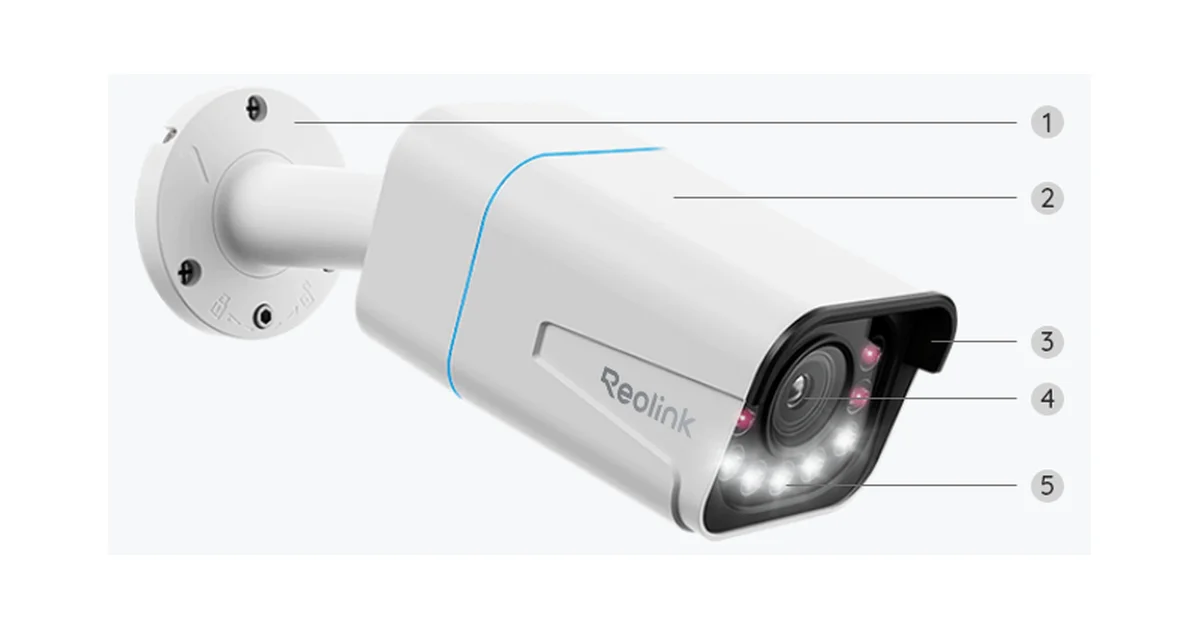
I have cycled through a lot of security cameras. Cloud-locked WiFi cameras that wanted a monthly fee to let me see my own footage, a doorbell that phoned home to three countries, a battery camera that was always dead the one time I needed it. When I finally committed to a real local setup built on Frigate and Home Assistant, I needed cameras that were wired, high resolution, and completely free of the cloud. The Reolink RLC-811A is the camera I settled on, and eight months and four units later it is still the one I recommend first.
This is the review after running these things through two winters, a heat wave, and a lot of Frigate tuning, not after a weekend on the bench. The short version: the RLC-811A is the best local 4K PoE camera you can buy for a Home Assistant setup in 2026, the 5x optical zoom genuinely earns its place, and the only real asterisks are the field of view and the fact that you still want Frigate doing the actual object detection.
Why PoE and Why Local
Let me get the philosophy out of the way, because it explains every choice I made. I do not want my cameras on the cloud. Not because I am paranoid about a specific company, but because a camera that depends on a vendor’s servers is a camera that stops working when that vendor has an outage, changes its pricing, or decides your three-year-old model is end of life. I have watched all three happen to friends. A local camera that speaks plain RTSP will still work in ten years because nothing about it depends on a company staying in business.
PoE, power over Ethernet, is the other half of the equation. One Cat6 cable carries both power and data to the camera, so there is no wall wart near the eaves, no battery to swap, and no WiFi channel to congest. My four RLC-811A cameras each run a single cable back to an 8-port PoE switch in the basement, and that switch feeds my Home Assistant box and the Frigate instance that records everything. The whole thing is wired, local, and boring in the best way. When my internet goes down, my cameras keep recording, and I can still pull up any feed on the wall tablet.
The RLC-811A fits this philosophy perfectly because it is, at its core, a dumb-but-excellent sensor that exposes a standard stream and gets out of the way. The intelligence lives on my server, where I control it.
The 4K Sensor and the Zoom That Matters
The headline spec is the 8MP sensor putting out a true 3840 by 2160 main stream. Plenty of cameras claim 4K now, so that alone is not special. What sets the RLC-811A apart in its price class is the 5x optical zoom. This is a real motorized lens, not a digital crop, so when you zoom in you keep every pixel of resolution instead of enlarging a blurry patch.
The practical difference is enormous. My driveway camera sits under the eave and normally frames the whole driveway and a slice of the street. When I zoom it in on the curb, roughly 60 feet out, I can read a license plate cleanly, day or night with the spotlight on. A fixed-lens 4K camera at that distance gives me a smear that says a car was there but tells me nothing useful. For a camera whose entire job is to answer “what exactly happened,” optical zoom is the feature that turns footage from a vague record into actual evidence.
Dual Streams Are the Secret Weapon for Frigate
Here is the technical detail that made me pick Reolink over half a dozen other 4K cameras: the RLC-811A serves two independent RTSP streams at once. There is a high-resolution main stream at the full 4K, and a low-resolution sub stream, typically 640 by 480 or 896 by 512 depending on firmware. Both are live at the same time over the network.
If you have ever run Frigate, you know why this matters. Object detection is expensive. Running a neural detector on a full 4K frame is a waste of compute, and even a Coral TPU chokes if you feed it 8MP frames at any real frame rate. The correct Frigate setup is to point the detect role at the tiny sub stream, so the detector runs fast and cheap, and point the record role at the 4K main stream, so your saved clips are full quality. When Frigate flags a person on the low-res feed, it saves the high-res footage.
The RLC-811A does this natively with zero transcoding. My Frigate config for each camera is dead simple: the sub stream on port 554 with path h264Preview_01_sub goes to detect, and h264Preview_01_main goes to record. My Coral handles all four cameras at once and barely breaks a sweat because it never sees a 4K frame. A single-stream camera forces Frigate to downscale the 4K feed itself in software, which burns CPU you do not have to spare. The dual-stream design is the difference between a Frigate box that hums along and one that thermal-throttles.
Getting It Into Home Assistant
Setup is refreshingly boring, which is the highest compliment I give hardware. Plug the camera into a PoE port, wait 30 seconds for it to boot, and it grabs an IP. I assign it a DHCP reservation on my home network so the address never changes, which matters because Frigate references cameras by IP.
In Home Assistant, the official Reolink integration finds the camera by IP and asks for the credentials you set in the Reolink app or web UI. Once added, you get the live streams, the ability to move the zoom and focus, motion and AI event sensors, the spotlight and siren as switches, and the ability to toggle the infrared and the recording state, all as native entities. I drive several automations off it: the porch camera’s spotlight comes on when a Frigate person event fires after dark, and the driveway camera announces “car in the driveway” on the kitchen speaker during the day.
The one setting I always change first is disabling Reolink’s cloud connection in the camera’s own settings. There is a toggle called UID or Reolink Cloud, and turning it off means the camera never talks to Reolink’s servers. Everything I described above still works because it is all local. This is the step people forget, and it is the whole reason to buy a PoE camera instead of a cloud one.
Night Vision and Weatherproofing
The RLC-811A has both infrared night vision and a pair of spotlights. In pure IR mode it produces a clean black-and-white image out to the rated 100-plus feet, and it is genuinely good, sharp enough that Frigate detects people reliably in the dark. The spotlights kick on to give you color at night, either automatically on motion or on a schedule you set. Color night footage is far more useful for identifying people and cars, so on my driveway and porch cameras I leave the spotlights set to trigger on a Frigate person event rather than every raccoon.
The one honest caveat here is that there is no true color night vision without light. Some newer cameras have big f1.0 apertures that pull color in near darkness with no spotlight. The RLC-811A needs its spotlight for color, which means it announces itself. If you want a covert camera that watches in color without lighting up, this is not it. For most people that is fine, because a visible spotlight is a deterrent, but it is worth knowing.
On weatherproofing, these are IP66-rated metal-bodied cameras and they have earned my trust. Mine have been through two full winters with weeks below freezing, ice storms, and a summer where the south-facing one bakes in direct sun all afternoon. Zero failures, no fogging inside the lens, no water intrusion, no dead units. The metal housing feels like it will outlast the electronics inside it.
The Field of View Trade-off
The nitpick that matters most is coverage. The RLC-811A has a 123 degree diagonal field of view, which sounds wide but in practice is narrower than a lot of cheap fixed-lens cameras that go to 150 degrees or more. Combined with the zoom lens, this camera is designed to watch a specific zone well rather than blanket a huge area loosely.
In practice this changes how you plan. Instead of one camera trying to see the whole backyard, I use the RLC-811A to cover defined approaches: the driveway, the front walk, the side gate, the back door. Each one owns its lane and covers it in sharp 4K with zoom in reserve. If you want a single camera to survey a wide open field, a wider fixed camera is a better fit and the outdoor camera roundup covers those options. But for the job of watching the specific places people actually approach your house, the tighter framing plus zoom is the right tool.
The Bottom Line
The Reolink RLC-811A is the camera I keep buying. It is a wired 4K PoE camera with a real optical zoom, dual streams that make Frigate purr, native Home Assistant support, and the ability to run completely free of the cloud. It has survived two winters of abuse without a single failure, and the footage it produces is the kind you can actually use rather than squint at.
It is not a five-star product only because of two honest limits: the narrower field of view means you plan placement deliberately, and there is no color night vision without the spotlight. Neither is a dealbreaker for the way most people should build a local camera system, which is a set of cameras each watching a defined approach and feeding one central NVR.
If you are building a local, cloud-free camera setup around Home Assistant and Frigate, buy one RLC-811A, wire it to your worst blind spot, and see how the 4K and the zoom change what your system can tell you. You can check the current price of the Reolink RLC-811A on Amazon, and if you are starting from scratch the bundle with a PoE injector saves you sourcing power separately. In my house it has been the quiet, reliable eyes I stopped thinking about, which is exactly what a security camera should be.