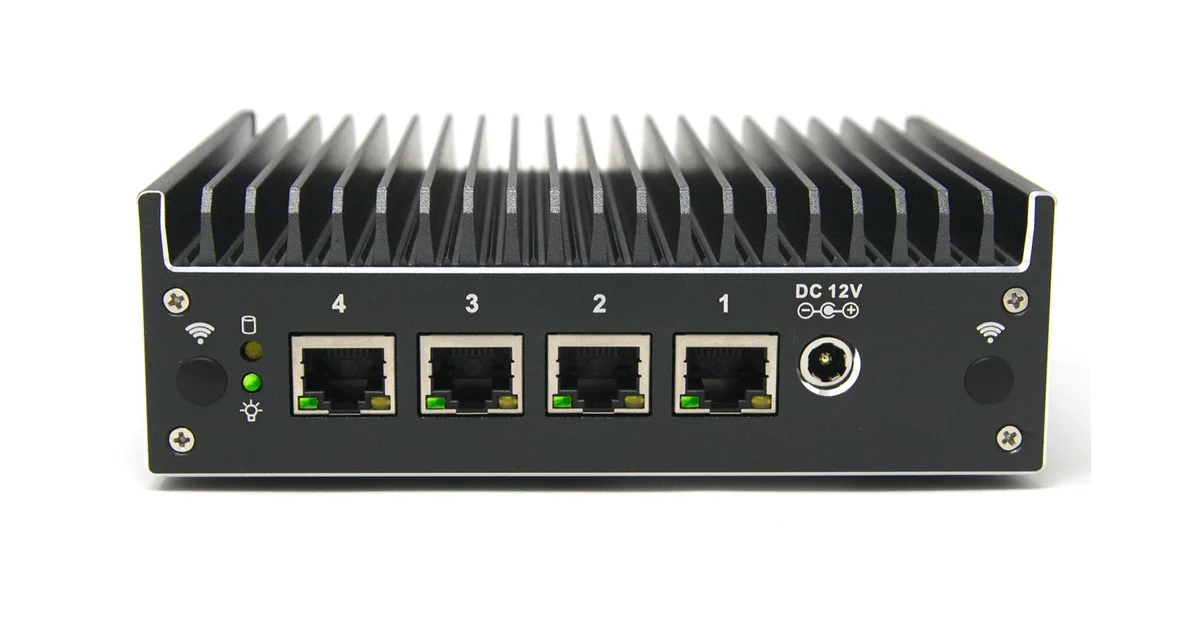
I have owned a lot of consumer routers, and every single one followed the same arc: great for a year, then a security advisory, then a vendor who quietly stops shipping firmware, then a slow slide into e-waste. My 2.5GbE network upgrade finally pushed me over the edge, because the all-in-one router at the head of it became the one device I did not fully control. So I built a proper firewall: OPNsense running on a fanless Protectli Vault Pro VP2420 with four 2.5GbE ports. This is the full build log, including the parts that annoyed me.
Why Build a Firewall Instead of Buying a Router
The pitch for rolling your own is not speed, though you get that too. It is control and longevity. OPNsense is open-source FreeBSD-based firewall software that gets updates for as long as the project lives, which is to say indefinitely, not until a manufacturer decides your model is end-of-life. You get enterprise-grade features that consumer gear either hides behind a subscription or does not offer at all: proper VLAN segmentation, granular firewall rules, local recursive DNS with block lists, a built-in WireGuard VPN, and traffic shaping that actually works.
The other half of the pitch is that the hardware outlives the software fashion. A well-chosen mini PC will route your network for a decade. When OPNsense adds a feature or you outgrow a package, you update software, not landfill a plastic box. For a device that sits at the single most important chokepoint of your home network, that ownership is worth the afternoon it takes to build.
I want to be honest about who should not do this. If all you want is WiFi that works and you never think about VLANs, a good consumer router or a mesh system is fine and simpler. This build is for people who want a real network, run a home lab, or simply refuse to hand their perimeter to a vendor who will abandon it.
The Hardware: Why the Protectli Vault
I wanted three things from the hardware: fanless, multiple 2.5GbE ports, and enough CPU to route multi-gig without straining. The Protectli Vault Pro VP2420 hits all three. It is a solid aluminum, completely fanless box with four Intel I225-V 2.5GbE NICs and an Intel Celeron J6412 that supports AES-NI for hardware-accelerated crypto. That last detail matters for VPN throughput.
Four independent 2.5GbE ports is the feature that sold me. Intel NICs are the gold standard for OPNsense because FreeBSD’s driver support for them is rock solid, unlike the Realtek NICs that plague cheaper generic firewall boxes and cause intermittent throughput and stability headaches. Paying for genuine Intel silicon is the single best hardware decision in this build.
The Vault ships barebones, so I added parts. A single 16GB DDR4 SODIMM is overkill for pure routing but gives comfortable headroom for Suricata, caching DNS, and a couple of packages. A small 256GB NVMe M.2 SSD is far more than OPNsense needs, but NVMe is cheap now and the extra space lets logs and reporting breathe. Total build cost landed a bit above a premium consumer router, and unlike that router it will still be getting security updates in 2035.
If you want the cheaper end of this idea, a generic N100 four-port box costs less, but you trade Intel NIC reliability and the Protectli’s build quality and coreboot firmware for it. I have run both. The Protectli is the one I stopped thinking about.
Installing OPNsense
The install is genuinely easy, with two gotchas worth calling out. You write the OPNsense installer image to a USB stick, plug it into the Vault, and here is gotcha one: these fanless boxes have no video output you will use day to day, so you configure over serial console. The Protectli exposes a serial port, and you connect at 115200 baud from a laptop to watch the installer. It threw me the first time because I expected HDMI to just work; serial is the intended path and it is painless once you know.
Boot the installer, log in with the default installer credentials, and run the guided installer. Choose ZFS if you want the option of snapshots and bit-rot protection on that NVMe, which I did. The installer copies over in a couple of minutes, you remove the USB stick, and it reboots into OPNsense.
Gotcha two is interface assignment. OPNsense asks which physical NIC is WAN and which is LAN, and on a four-port box they show up as igc0 through igc3 with no labels on the ports that match. I assigned WAN to the leftmost port and LAN to the next one, guessed wrong the first time, and just re-ran the assignment until my WAN port pulled a public IP from the modem. Five minutes of trial and error. Once assigned, you plug a laptop into the LAN port, browse to the default gateway address, and you are into the web UI.
First-Boot Configuration That Actually Matters
Out of the box OPNsense is already a competent firewall, but a few settings turn it into the router I actually wanted.
The first is Unbound DNS with block lists. OPNsense’s built-in Unbound resolver does local recursive DNS, and turning on the DNSBL feature with a couple of well-known block lists gives me network-wide ad and tracker blocking with zero extra hardware. This alone replaced a separate Pi-hole box I used to babysit.
The second is WireGuard. OPNsense has WireGuard built in, and the J6412’s AES-NI means VPN throughput is not a bottleneck. I set up a WireGuard tunnel so I can reach my home lab and self-hosted services from anywhere without exposing anything to the open internet. Configuration is a few fields in the UI plus a client profile, and performance is far better than the creaky OpenVPN most consumer routers ship.
The third is VLANs. With four physical ports plus VLAN tagging to a managed switch, I split the network into trusted devices, IoT gear that I do not trust an inch, guests, and the lab. Firewall rules then enforce that my smart plugs cannot talk to my NAS. This is the segmentation consumer routers gesture at with a “guest network” toggle and OPNsense does properly.
Power, Noise, and Living With It
A router runs every hour of every day for years, so the boring numbers matter more than peak throughput. The fanless VP2420 idles low, in the single-digit-to-low-teens watts range under a normal home load, which is comparable to the wall-wart consumer router it replaced and a rounding error on my power bill. Because it is fanless there is nothing to spin up under load, nothing to clog with dust, and nothing that will fail at 3am and take my internet down. The aluminum chassis is the heatsink.
Noise is zero. That sounds trivial until you have lived with a mini PC that has a whiny 40mm fan on a shelf in a quiet room. My old firewall attempts on repurposed hardware always had some fan I eventually wanted to strangle. The Vault sits silently next to my managed switch and I forget it exists, which is exactly what you want from infrastructure.
Reliability has been the quiet win. In months of running it I have had zero unexpected reboots, zero NIC dropouts, and zero of the mysterious “reboot the router” moments that consumer gear trains you to accept. OPNsense updates are a two-click affair from the web UI, and the ZFS install means I can snapshot before an update and roll back if anything misbehaves. It has behaved like an appliance, which is the highest compliment I can pay a self-built box.
The maintenance load is genuinely low once it is set up. I check for updates every few weeks, glance at the traffic and DNS-block dashboards occasionally because they are interesting, and otherwise leave it alone. This is not a project that demands constant attention after the initial afternoon. It just runs.
Does It Beat a Consumer Router?
After a few months, yes, decisively, with one caveat. On raw routing the VP2420 pushes my full multi-gig WAN to LAN at line rate without the CPU noticing, because plain NAT and routing on Intel NICs is light work. The place CPU load shows up is Suricata inline IDS/IPS: turning on full inspection at multi-gig speeds is where a J6412 starts to sweat, and if IDS at line rate is your priority you want a beefier CPU. For a normal home network with WireGuard, DNS filtering, and firewall rules, the Vault has enormous headroom.
The caveat is that this is not plug and play. You configure it, you learn a little networking, and you own the result. A consumer router hides all of that and also hides the fact that it will be abandoned. If you value the convenience more than the control, buy the appliance. If you have read this far, you probably do not.
The Bottom Line
Building an OPNsense firewall on a fanless Protectli Vault Pro VP2420 is the networking upgrade I should have done years ago. For a bit more than a premium consumer router, I got four reliable Intel 2.5GbE ports, silent fanless operation, line-rate multi-gig routing, proper VLAN segmentation, network-wide DNS filtering, and a WireGuard VPN, all on software that will keep getting security updates long after any consumer router would have been abandoned.
The build takes an afternoon, the serial-console install and interface assignment are the only mild speed bumps, and the payoff is a router you fully control sitting at the most important point in your network. If you already care about your home network enough to run 2.5GbE, this is the box that deserves to sit at the front of it.