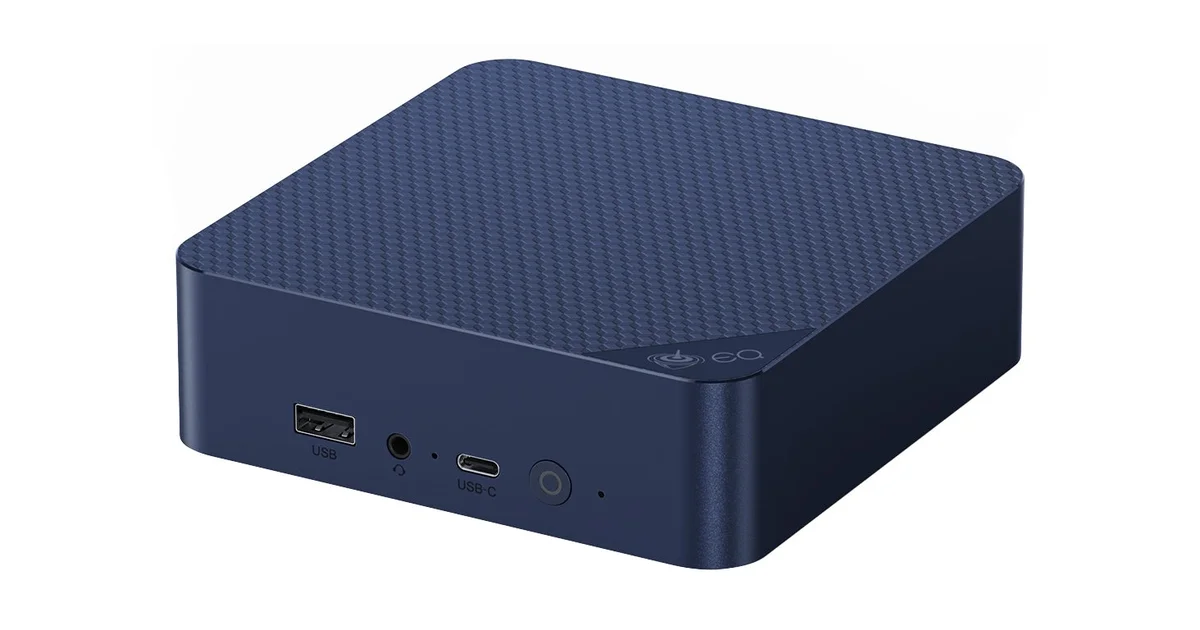
I fell out of love with the Raspberry Pi somewhere around the third SD card that corrupted itself and the second time I paid scalper pricing for a board that a used office PC would have outrun. What finally replaced it on my shelf is a palm-sized Beelink EQ14 running Intel’s N150, and the thing that sold me was not raw speed. It was the combination of two 2.5GbE ports, a genuinely low idle draw, and a price that undercuts a fully kitted Pi.
This is a hands-on review after running the EQ14 as a full-time home lab node: Proxmox on the metal, a stack of LXC containers, and a couple of light VMs. It is not a benchmark chase, because nobody buys an N150 for benchmarks. It is a look at whether this specific little box is the right always-on machine for the jobs most of us actually run at home.
The spec sheet that matters
The Beelink EQ14 is built around Intel’s N150, a four-core, four-thread chip from the Twin Lake refresh of the Alder Lake-N line. It boosts to 3.6GHz, has no hyperthreading, and sips power. My unit came with 16GB of DDR4 and a 500GB SSD, and it has dual M.2 slots plus dual HDMI, WiFi 6, and Bluetooth 5.2.
But the two ports that make this box interesting for a home lab are the pair of Intel 2.5GbE NICs. Two real 2.5-gigabit NICs on a machine this cheap is the whole reason it earns a spot over a Raspberry Pi or a single-NIC mini PC. It means the EQ14 can be a router, an OPNsense or pfSense firewall, a NAS front-end with a fast link to your storage, or a Proxmox node with one port for management and one for VM traffic. A single-NIC box cannot do half of those jobs cleanly.
The honest limitation up front: the N150 runs single-channel DDR4 and officially tops out at 16GB. That caps memory bandwidth and, more importantly for a hypervisor, caps how many heavy VMs you can stack. For the workloads I describe below, 16GB has been plenty. If your plan is to run four Windows VMs, this is the wrong class of machine and you want a used SFF desktop with a real desktop CPU instead.
Power draw is the whole point
The reason I run an N150 and not a used business desktop is the electric bill. A home lab node runs 24/7/365, so idle wattage is the number that actually costs you money, and this is where the EQ14 shines.
Mine idles at around 6 watts at the wall with Proxmox up and my normal container stack running, and it rarely climbs past 15 watts under the loads I throw at it. At my electricity rate, 6 watts continuous is a couple of dollars a year. Compare that to a used Dell OptiPlex pulling 25 to 40 watts at idle, and over a few years the mini PC’s higher purchase price disappears and then some.
That low draw also means it runs cool and quiet. The EQ14 has a small fan, but at idle it is effectively silent, and it lives on an open shelf in my office without me ever noticing it. If you are building a quiet home lab, a box that idles at single-digit watts and barely spins its fan is exactly the kind of component you want.
For the same reason, it pairs beautifully with a small UPS for your home server: a 6-watt load means even a modest battery holds it up for a very long time through an outage.
What it runs comfortably
Here is what actually lives on my EQ14, because “it runs Proxmox” is meaningless without knowing what you can pile on top.
On the metal I run Proxmox VE. Under it, a stack of LXC containers handles the always-on services: Pi-hole for DNS and ad blocking, a reverse proxy, Home Assistant talking to my Zigbee gear, a small Postgres instance, an MQTT broker, Uptime Kuma, and a couple of other lightweight web apps. LXCs are the trick here. Because they share the host kernel instead of virtualizing a whole machine, a dozen of them barely register on the N150, and this is exactly the workload the chip is built for.
For things that genuinely need a VM, I run two: a Debian VM for Docker workloads I do not want touching the host, and a small utility VM I spin up and tear down for testing. Both run fine. What I would not do is run three memory-hungry VMs at once, because 16GB fills up faster than CPU does on this box. Memory, not the processor, is your ceiling.
The dual 2.5GbE is what makes the storage side pleasant. My containers pull from a NAS over one of the 2.5GbE links, and moving backups or media around no longer bottlenecks on gigabit. If you have already done a 2.5GbE network upgrade, a node with two matching NICs slots right in. If you have not, this box is a good reason to start.
The one thing to know: the N150 has Intel Quick Sync, so it can hardware-transcode a stream or two in Jellyfin or Plex. It is not a transcoding monster, but for one or two concurrent streams it does the job without the CPU catching fire.
Setup notes and the small gotchas
A few practical things from setting mine up.
The RAM is soldered on some N150 units but socketed SODIMM on the EQ14, though it is single-channel and single-slot, so 16GB is the practical ceiling. Do not buy this expecting to drop in 32GB later. If 16GB is not enough, you bought the wrong tier.
The dual M.2 slots are genuinely useful. The retail unit ships with a SATA SSD in one slot, and you can add an NVMe drive in the other for faster VM storage or a mirror. I added a second drive and moved my Proxmox VM images onto NVMe, which made container and VM disk I/O noticeably snappier.
Wipe Windows first. The unit ships with Windows 11, which you will immediately delete to install Proxmox or your hypervisor of choice. Flash Proxmox to a USB stick, boot from it, and in fifteen minutes you have a proper node. Nothing about the EQ14 fights you here, but if you have never done a headless Proxmox install, keep a monitor on one of the HDMI ports for the initial setup.
If you want the wider context on picking this class of machine, I compared several options in my best mini PC for a Proxmox home lab guide, and the EQ14 is the low-power, dual-NIC pick in that lineup.
Where it falls short
Two honest limits, beyond the memory ceiling already covered.
Single-channel memory. The N150’s single memory channel means bandwidth-heavy work, big compiles, heavy databases, anything that hammers RAM, will feel the pinch versus a dual-channel machine. For the container-heavy always-on workload most home labs run, you will never notice. For anything memory-bandwidth-bound, you will.
Not an expansion platform. There is no PCIe slot, no room for a GPU, no way to add a 10GbE card. What you see is what you get. If your home lab dreams involve a graphics card for AI work or a big ZFS array with add-in HBAs, this is a companion node, not the main event. Treat the EQ14 as the efficient always-on box that handles your core services, and let a bigger machine handle the heavy lifting.
How it stacks up against the alternatives
If you are cross-shopping, three comparisons come up constantly, so here is where I land on each.
Versus a Raspberry Pi 5. Once you add a proper power supply, an active cooler, a case, and an NVMe hat with an SSD, a Pi 5 build lands in the same money as the EQ14, and you still end up with a single gigabit NIC, an ARM chip that some containers do not have clean images for, and less RAM. The EQ14 gives you x86, 16GB, two 2.5GbE ports, and internal M.2 storage for the same or less. Unless you specifically need the Pi’s GPIO header for a hardware project, the mini PC wins for a home lab node outright.
Versus a used business SFF desktop. A used OptiPlex or EliteDesk with a real desktop CPU will beat the N150 on raw compute and takes more RAM, and if you need that horsepower, buy one. But it idles at three to six times the wattage, it is far larger, and it is louder. For a box that runs every hour of every day, the EQ14’s power and noise advantage is the deciding factor for me. I keep a bigger machine for heavy lifting and let the EQ14 handle the always-on services.
Versus a higher-tier mini PC. Step up to an N305 or a Ryzen mini PC and you get more cores, dual-channel memory, and a higher RAM ceiling, at a higher price and higher idle draw. That is the right move if you know you need it. But most people overestimate what their home lab actually demands. My container stack, which covers DNS, Home Assistant, a reverse proxy, databases, and monitoring, does not come close to maxing out an N150. Buy the tier you need, not the tier that looks impressive on paper.
The Bottom Line
The Beelink EQ14 is the machine that finally got the Raspberry Pi off my shelf for good. It idles around 6 watts, it has two real 2.5GbE ports, it takes 16GB of RAM and dual M.2 drives, and it runs Proxmox with a full stack of containers and a couple of VMs without complaint, all for less than a fully kitted Pi costs once you add storage and a case.
It is not an expansion platform and 16GB is a hard ceiling, so know your workload. But for the specific job most of us actually need, an efficient, quiet, always-on node running the core services of a home lab, the EQ14 is the best dollar-per-watt-per-capability box I have bought. If that is the machine you are shopping for, grab one on Amazon, wipe Windows, and put Proxmox on it.