For two years my desktop headphone chain was a dongle. A little USB-C dongle hanging off the back of my monitor, doing an honest job, driving my IEMs fine and my open-backs not quite. I kept telling myself it was enough because adding a “real” DAC and amp felt like the start of an expensive hobby I did not want to fall into.
Then I bought the FiiO K11 for $130, plugged my open-backs into the balanced output, and heard them open up in a way the dongle never managed. Four months later it is the easiest desktop audio recommendation I can make to anyone who has outgrown a dongle and does not want to spend real money. This is the review.
What the K11 Actually Is
The K11 is a desktop DAC and headphone amplifier in one box. “DAC” is the digital-to-analog converter that turns the bits coming out of your computer into an analog signal. “Amplifier” is the stage that takes that signal and gives it enough muscle to drive headphones properly. Cheap sources skimp on the amplifier, which is exactly why demanding headphones sound thin and quiet off a laptop jack or a dongle.
Inside, the K11 uses a Cirrus Logic CS43198 DAC chip feeding a pair of amplifier stages. The CS43198 is a well-regarded part known for a clean, low-noise presentation, and FiiO has used it across a lot of its lineup. The headline number is the power: up to 1400mW into 32 ohms on the balanced output. That is a genuinely large amount of power for a $130 box and it is the reason this thing can drive headphones a dongle cannot.
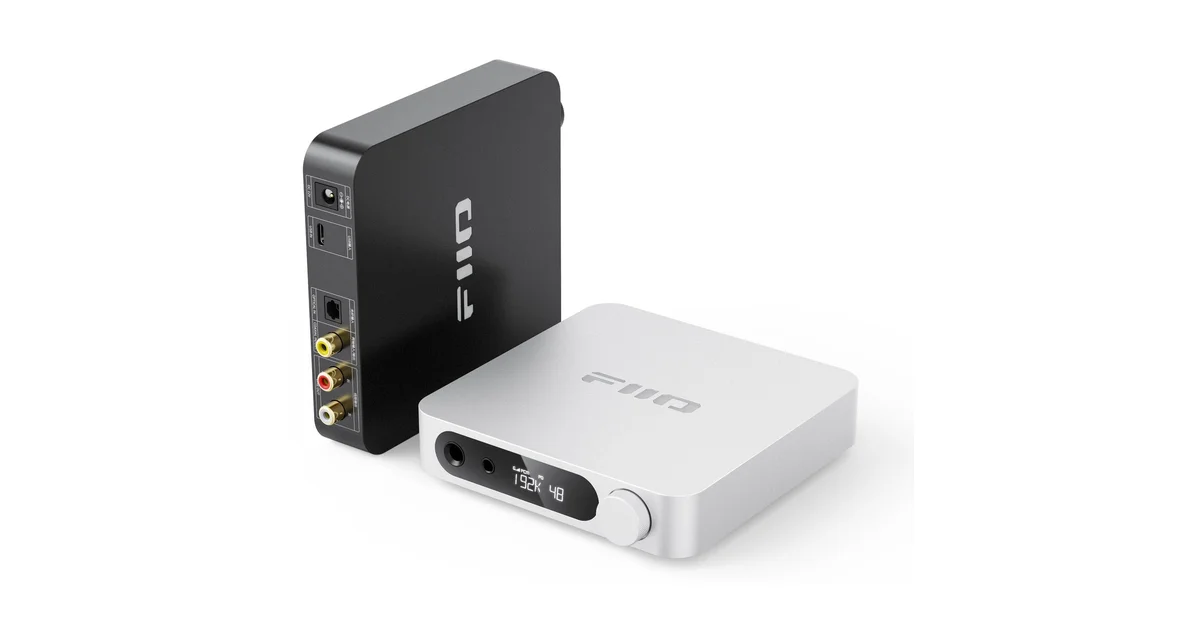
It is a real desktop unit. It measures about 147 by 133 millimeters and weighs around 400 grams, with a small custom LCD on the front showing input, volume, and sample rate. It sits on the desk and stays there. This is not a portable, and that framing matters for a couple of the trade-offs below.
The Connectivity Is the Quiet Win
Flip the K11 around and you get the kind of input and output selection that usually costs more.
On the input side:
- USB-C from your computer, the way most people will use it. It handles up to 384kHz/32bit PCM and DSD256, which is more than any normal library needs but nice to have.
- Coaxial digital in, for a CD transport, a streamer, or a game console with optical-to-coax.
- Optical digital in, for a TV or anything with a TOSLINK output.
On the output side:
- 6.35mm single-ended headphone jack, the standard quarter-inch plug.
- 4.4mm balanced headphone jack, which is where the real power lives.
- RCA line out, which is the output people overlook and then fall in love with.
That RCA line out is what turns the K11 from a headphone box into the hub of a desk. I run mine into a pair of powered studio monitors as the source, so the same unit feeds my headphones and my speakers and I switch between them without re-plugging anything. If you already own active monitors like the Edifier MR4, the K11 makes a clean front end for them.
Setup and the Gain Switch That Matters
Getting running takes about five minutes. Plug in the included 12V power adapter, run a USB-C cable to your computer, plug in your headphones, and your operating system picks it up as a standard audio device with no drivers on Mac or Linux. Windows wants the FiiO driver for the highest sample rates but works without it for everyday listening.
The control that actually matters is the gain switch, and the K11 gives you three levels instead of the usual two. Low, medium, and high gain, and FiiO did something smart: each gain level has its own volume curve tuned for that range. Low gain for sensitive IEMs keeps the usable volume spread across the whole knob instead of everything happening in the first eighth of a turn. High gain for power-hungry open-backs gives you the headroom to actually move them.
Match the gain to the headphone and the K11 behaves. Sensitive in-ears on low, easy headphones on medium, demanding 250 to 300 ohm cans on high. Get this wrong and you will either have no usable volume range or run out of power, and then wrongly blame the amp.
How It Sounds
The defining quality of the K11 is how quiet it is. The background is black. With most headphones there is no audible hiss when the music stops, just silence, and that silence is the canvas that makes everything else sound clean. At this price, a genuinely quiet noise floor is not a given, and the K11 nails it.
The presentation itself is clean and uncolored. The K11 is not trying to add warmth or a “house sound.” It gets out of the way and lets the headphones be what they are. My open-backs sound like my open-backs, my IEMs sound like my IEMs, and the K11 just supplies clean power and a quiet background. That is exactly what I want from a source at this level. If you want coloration, you add it with the headphones, not the amp.
Where you hear the power is on demanding open-backs. Plugged into the balanced output on high gain, a pair of Sennheiser HD600s, which are famously a little hard to drive well, snap to attention. The bass gets control it never had off the dongle, the dynamics open up, and the whole presentation goes from “fine” to “this is why people care about this stuff.” The K11 is rated to drive headphones up to around 350 ohms, which covers the vast majority of what a normal person will plug in.
The Balanced Output Is the Whole Point
Here is the thing to understand before you buy: the K11’s two headphone outputs are not equal. The single-ended 6.35mm jack puts out something like 520mW into 32 ohms. The 4.4mm balanced jack puts out the full 1400mW. That is nearly three times the power.
So the single most important accessory is a 4.4mm balanced cable for your headphones. If you only ever use the 6.35mm jack, you are leaving most of the K11’s grunt on the table and you might wonder what the fuss is about. Plug the same headphones into the balanced jack and they wake up. Many headphones offer a 4.4mm cable option, and it is the upgrade that unlocks what you paid for.
This is not a flaw, it is just how balanced amps work, but it is the one thing reviewers gloss over and buyers miss. Budget for the cable.
The One Real Caveat: IEMs and Output Impedance
Honesty time, because this is the spot where the K11 is not perfect. The balanced output has an output impedance of around 2.4 ohms. For headphones and most in-ears that is a non-issue. But for ultra-low-impedance multi-driver IEMs, the rough rule of thumb is that you want the source impedance to be under about one-eighth of the headphone’s impedance, and 2.4 ohms can nudge the frequency response of a very low impedance IEM.
In practice: if you are running normal headphones or single-dynamic-driver IEMs, ignore this entirely. If you are an IEM specialist with a stack of sensitive multi-balanced-armature monitors, use the single-ended output, which has a much lower output impedance, or know that the balanced jack might tilt the sound a hair. For the audience buying a $130 desktop unit to drive desk headphones, this caveat will never come up. I am flagging it because pretending it does not exist would be the dishonest move.
What It Is Not
A few things the K11 deliberately is not, so you buy it for the right reasons.
- It is not portable. It needs its 12V wall adapter and claims a power outlet. This is a desk fixture, not something you toss in a bag. If you want battery-powered portable, this is the wrong FiiO.
- It has no Bluetooth. Wired sources only. If you wanted to stream to it wirelessly, look elsewhere in the lineup.
- It has no remote. You reach over and turn the knob. At a desk, that is fine. In a living room rack, you might want a unit with a remote.
None of these are flaws for a desktop DAC and amp. They are just the boundaries of what this box is for. Buy it to anchor a desk, not to be a do-everything device.
Who Should Buy It
The K11 is for the person who has outgrown a dongle or a motherboard headphone jack and wants demanding headphones to sound the way they are supposed to, without spending more than the headphones cost. It is for the desk that runs both headphones and powered monitors and wants one clean source feeding both. It is for someone with a pair of HD600s or similar who has never heard them properly driven.
It is not for the IEM-only listener chasing the absolute lowest output impedance, and it is not for someone who wants wireless or portable. Know which one you are.
The Bottom Line
The FiiO K11 is the unit that ends the “do I need a real DAC and amp” debate for $130. It has more clean power than anything near the price, three genuinely useful gain levels, a black background that makes everything sound tidy, and enough connectivity to anchor a whole desk through its RCA line out. Buy a 4.4mm balanced cable at the same time so you actually get the 1400mW it advertises, mind the output-impedance note if you live in ultra-sensitive IEMs, and otherwise this is the easiest budget desktop audio recommendation I can give. It took my open-backs from “fine” to “oh, that is what everyone means,” and it did it for less than the cost of dinner out for the family.