I bought my house knowing exactly one thing about its wiring: it was going to fight me. Built in 1984, remodeled once badly in the early 2000s, and every switch box I opened had the same problem for anyone who wants smart switches. No neutral wire. Just a live and a switched load, the way houses were wired for decades before anyone imagined a wall switch would need to run a radio.
For a long time that meant I did all my automation with smart bulbs and left the switches dumb, which creates the single most annoying problem in home automation: someone flips the wall switch, the bulb loses power, and now half your automations are talking to a light that no longer exists on the network. The SONOFF ZBMINIL2 (also on Amazon) is the little module that finally let me make those dumb switches smart without running a single new wire. Six months and eleven switches later, here is the honest report.
Why no neutral is the whole ballgame
If you have never opened a switch box, here is the thing that trips up almost every first time smart home buyer. A modern smart switch needs constant power to run its Zigbee or Wi-Fi radio, even when the light it controls is off. The clean way to get that constant power is a neutral wire, the return path that completes the circuit back to your panel. Newer homes run a neutral to every switch box. Older homes, and a shocking number of homes built well into the 2000s, only ran the live wire and the switched load to the box. The neutral stayed back at the light fixture.
That single missing wire is why so many people buy a beautiful smart switch, open the wall, find three wires where they expected four, and quietly return it. You cannot legally or safely fake a neutral by borrowing the ground. So the entire no neutral category exists to solve one problem: how do you keep the radio alive when the only wires in the box are line and load?
The ZBMINIL2 solves it the way most no neutral switches do. It passes a tiny trickle of current through the light fixture itself to keep its radio powered. That current is small enough that a normal bulb stays dark, but it is enough to run the Zigbee chip. This is elegant and it is also the source of every quirk I will describe later, because that trickle has to go somewhere, and very efficient LED bulbs sometimes react to it by glowing faintly or flickering.
What you actually get
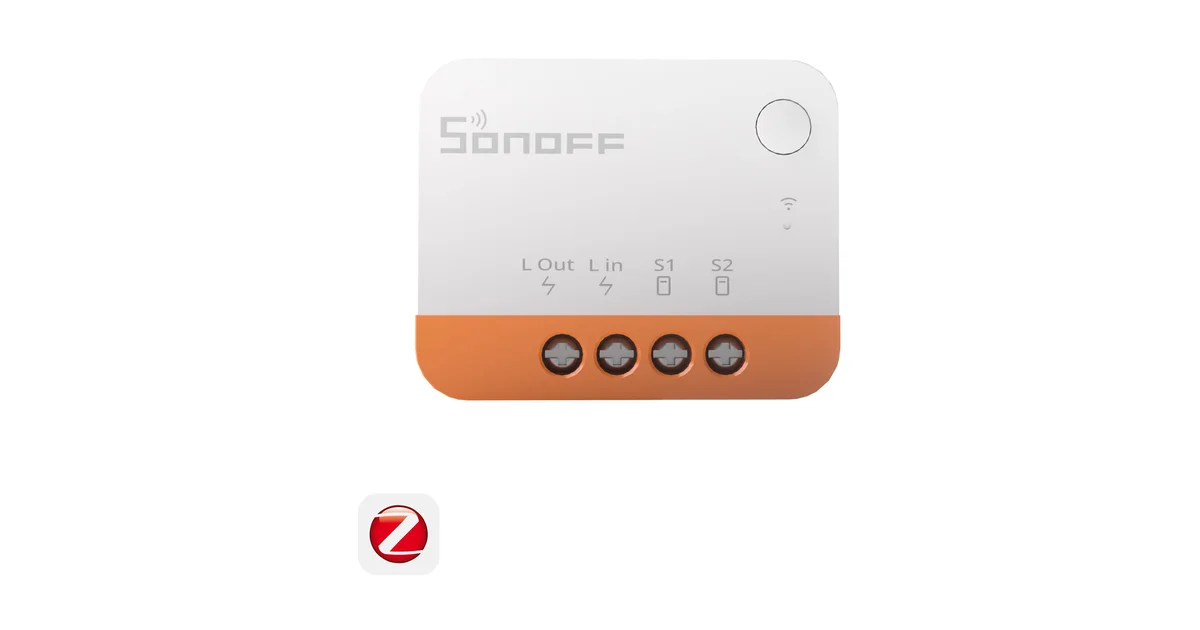
The ZBMINIL2 is not a faceplate switch. It is a relay module about the size of two stacked matchbooks that hides inside the wall box behind your existing dumb switch. You keep your current rocker or toggle on the wall, wire the module in behind it, and the module becomes the smart brain while your old switch becomes a dumb input the module reads. SONOFF calls this the detached, or external, switch setup and it is the part people get wrong on the first try.
In the box you get four terminals that matter: line in, load out to the fixture, and two terminals labeled S1 and S0 for the external switch. Your existing wall switch wires land on S1 and S0. It reads the state of that switch and translates flips into Zigbee events, rather than the switch directly cutting power. That is what lets you set the wall switch to toggle, or to act as a momentary button that fires scenes, entirely in software.
The build quality is fine for what it is. It is a Chinese OEM relay module, not a premium fixture. But it is UL and ETL adjacent depending on the batch, it is tiny enough to fit boxes that reject bigger modules like the Shelly, and at its price you can do a whole house without wincing. I picked mine up as a multipack on SONOFF direct (also on Amazon).
Pairing it to Home Assistant
This is where the ZBMINIL2 quietly wins over Z-Wave and over any cloud switch. It is plain Zigbee 3.0, so it joins your existing Home Assistant Zigbee network with no app, no account, and no bridge. If you already run a coordinator like the SONOFF ZBDongle-E, you are two minutes from a working switch.
The flow is the same one you use for any Zigbee device. Put your coordinator into permit join, then press and hold the pairing button on the module, or five quick flips of the connected wall switch on newer firmware, until the network indicator blinks. In Zigbee2MQTT it shows up as SONOFF ZBMINIL2 with entities for the switch state and, importantly, a setting for the external switch type. Set that to the toggle or momentary behavior that matches your physical switch and you are done. In ZHA it surfaces the same on off entity and the switch type through the cluster configuration.
One habit that pays off: pair the module at the wall box, not on the bench. No neutral modules behave differently on a bench power supply than they do wired to a real fixture load, and I have watched a module that paired perfectly on the bench refuse to hold its network at the wall. Wire it in, restore power, then pair. If it drops off later, it is almost always a mesh routing problem and not the module, so add a mains powered Zigbee router nearby before you blame the switch.
Once it is in Home Assistant it is just a switch entity. I drop it straight into automations, expose it to voice, and use the external switch events to trigger scenes. Because the control loop is local Zigbee, the light responds even when my Home Assistant server is rebooting, which is the entire reason I refuse to buy cloud switches.
The flicker problem, and how to actually fix it
Here is the part the marketing will not tell you clearly. On a no neutral switch, the trickle current that keeps the radio alive has to pass through your light fixture. With most loads that is invisible. With very efficient, very low wattage LED bulbs, that trickle can be enough to make the bulb glow faintly when it should be off, or flicker, or in the worst case make the switch itself unstable.
I hit this on exactly two of my eleven installs, both of them closets with a single 4 watt LED bulb. The fixes, in the order I would try them:
First, add the capacitor bypass. SONOFF sells a small bypass that wires in parallel with the bulb at the fixture. It gives the trickle current a place to go that is not your LED driver, and it killed the ghost glow in both of my closets instantly. If you know you have low wattage LED loads, buy the bypass with the switch and save yourself a second trip up the ladder.
Second, raise the load. Swapping a single 4 watt bulb for a 9 watt bulb, or adding a second bulb to the fixture, often solves it without a bypass because the higher load absorbs the trickle. Not elegant, but it works.
Third, check your bulb brand. Cheap no name LED bulbs with minimal driver electronics are the worst offenders. Better bulbs from Cree or Philips tolerate the trickle far better. On a fixture that flickered with a bargain bulb, a name brand bulb sometimes fixes it outright.
What you cannot do is make the ZBMINIL2 keep a smart bulb alive. Because it cuts the load when it switches off and has no relay decoupling, a smart bulb downstream still loses power. If that is your goal you are shopping in the wrong category, and I would point you at a neutral required switch with detached relay mode like the Inovelli Blue Series instead.
How it compares to the alternatives
I ran the ZBMINIL2 against the two other no neutral paths I seriously considered.
Aqara makes a no neutral wall switch, but it wants the Aqara hub and its Zigbee implementation has historically been fussy on third party coordinators. It is a nicer looking faceplate, but it is a faceplate, which means it replaces your switch and needs the box depth. The SONOFF hides behind the switch you already have, so it fits more boxes and keeps whatever paddle you like.
Shelly makes an excellent no neutral module too, and if you want Wi-Fi with local API and web UI it is arguably the more flexible device. But it is Wi-Fi, which means one more device on your 2.4GHz network per switch, and it is physically larger so it loses the tight box comparison. For a Zigbee first Home Assistant setup where I want everything on one mesh, the SONOFF stays on the network I already trust.
The Inovelli Blue is the premium answer, but it needs a neutral. If your boxes have neutrals, buy the Inovelli and stop reading. This entire review exists for the houses where that is not an option.
Against all of them, the ZBMINIL2 wins on exactly two axes that matter in an old house: it installs where nothing else fits, and it costs little enough to do every switch. It loses on polish and on smart bulb keep alive. That is a trade I happily made eleven times.
Living with eleven of them
Six months in, the reliability has been better than the price suggests. Nine of the eleven have never dropped off the network or given me a single flicker. The two closets needed bypasses, which I added in an afternoon. None have failed, none have needed a firmware reflash, and none have required me to open the SONOFF app, which I have never installed on this network.
The things I would tell my past self: buy bypasses up front if you have LED heavy fixtures, pair at the wall not the bench, and make sure your Zigbee mesh has enough mains powered routers before you push a bunch of these end devices onto it. Do those three things and the ZBMINIL2 is close to install and forget.
The Bottom Line
The SONOFF ZBMINIL2 is not the best smart switch you can buy. It is the best smart switch you can buy when your walls refuse to give you a neutral wire, which describes a huge number of homes. It is tiny, it is cheap, it speaks plain Zigbee straight into Home Assistant with no cloud, and it turns a house full of dumb switches into a locally controlled smart home one box at a time. Buy the capacitor bypass alongside it, keep your expectations set to reliable on off rather than fancy relay tricks, and it will quietly do its job for years. For an old house on a budget, that is exactly the switch I wanted. Grab it direct from SONOFF with code JPK (also on Amazon), and if your boxes do have neutrals, read my Inovelli Blue Series review instead.