Whole-house audio gets expensive when people count speakers instead of zones. A pair of ceiling speakers is only the visible part of a room. Behind it are an amplifier, streamer, power, cable, network coverage, and a control method that somebody other than the installer can understand.
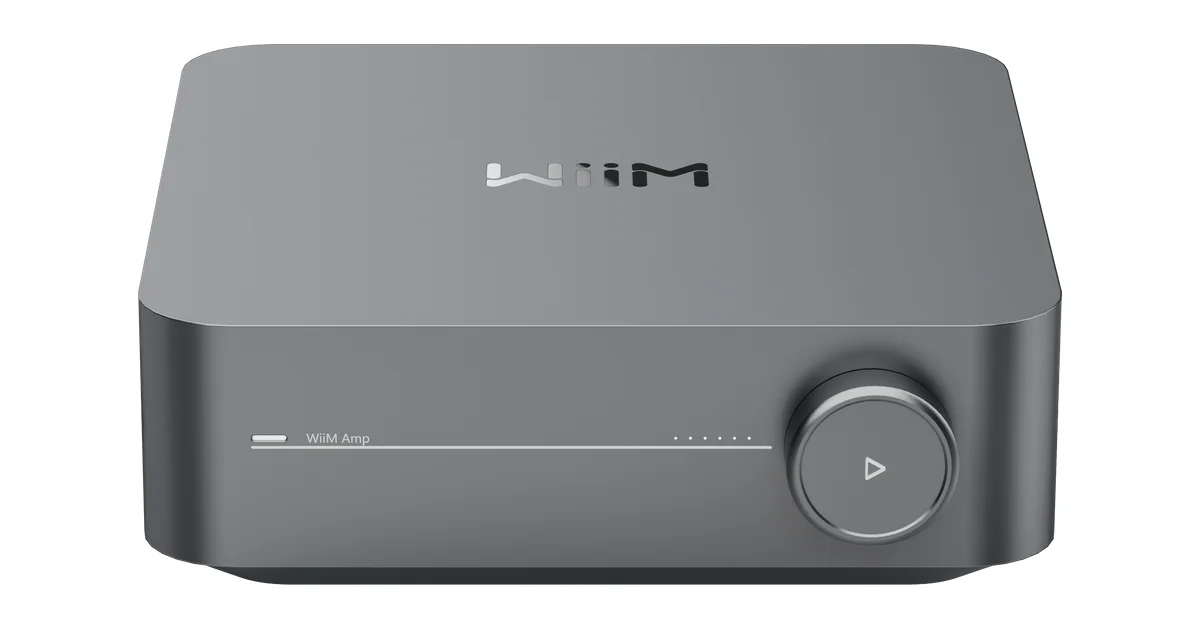
The WiiM Amp is compelling because it combines the amplifier and streamer for a passive stereo zone. It does not make the rest of the system disappear, but it gives me a repeatable building block. My whole-home audio guide compares broader platforms; this post is the room-by-room plan I would actually use for a WiiM-centered system.
Define Zones Before Buying Anything
A zone is a room or group of rooms that normally shares source and volume. It is not one speaker, and it is not necessarily one physical room.
I would start with a table containing room, speaker type, amplifier, streamer, network connection, power outlet, and default control. Kitchen and dining might be one zone. A living room may need its own zone because television audio and music have different volume expectations. A patio can join the kitchen for a party while remaining independent on an ordinary day.
Write down the groups you expect to use, but do not permanently wire those groups together. A good multi-room system lets zones join temporarily. The underlying room identities should stay stable so scenes, dashboards, and family habits do not break.
Match the Endpoint to the Room
For a passive stereo zone, the simple pattern is a WiiM Amp plus a pair of passive speakers. That works for bookshelf speakers, appropriately rated in-ceiling speakers, and many outdoor speakers installed with the correct weather considerations.
For a room that already has a receiver, use a WiiM Pro Plus into a line input instead. Adding a WiiM Amp there duplicates amplification and complicates gain staging. Conversely, a streamer cannot power passive speakers by itself, no matter how attractive the small box looks in a product photo.
For powered speakers, choose a line-level streamer that matches the inputs and desired control system. Keep casual rooms separate from the zones where sound quality and predictable playback matter most.
My default is not “the same product everywhere.” It is the same control model everywhere, with hardware chosen for the room. That makes a mixed system easier to afford and easier to repair.
Plan Speaker Placement, Not Just Cable Runs
A stereo pair should cover the listening area evenly. Putting both ceiling speakers near one wall creates a hotspot and a dead area, then encourages somebody to turn the zone up until it is loud everywhere.
During construction, I would mark the seating and work areas first, then place speakers around those areas. Keep speaker placement away from recessed lights, HVAC diffusers, and structural obstructions where practical. Follow local electrical and fire requirements; the audio plan does not replace them.
Bathrooms, hallways, and narrow utility spaces are often poor candidates for a conventional stereo pair. A small independent zone or a mono arrangement can be more intelligible and less wasteful. The best whole-house system is not the one with the most speakers. It is the one that sounds balanced at ordinary volume.
Run cable to an accessible location, label both ends, and leave service slack. Do not bury a power brick behind finished drywall. If a streamer or amplifier eventually fails, replacement should be a maintenance task rather than a renovation.
Wired Network Where It Is Easy
Multi-room playback is a network workload. A phone that briefly loses Wi-Fi can retry a web page. A group of players trying to maintain synchronized playback exposes weak coverage and multicast problems much faster.
I would wire fixed equipment in a rack, media cabinet, or accessible utility area when Ethernet is already nearby. Wireless is fine for rooms where running cable would damage finished surfaces, but test the actual endpoint in the actual location. Do not infer audio reliability from a phone’s signal bars.
Use DHCP reservations for players. They are not mandatory, but they make discovery and troubleshooting easier. Keep the endpoints on a network that can reach Home Assistant and the phones that control them. Guest-network isolation and client isolation are common reasons that a player works in its own app but cannot be discovered by other devices.
Test one endpoint for ten minutes before creating a group. Play, pause, resume, change volume, switch source, and let it sit. Then test two zones. Only after that should you test the largest group the household will use.
Budget the Complete Zone
The WiiM Amp price is only one line item. A realistic zone budget includes the amplifier, speakers, speaker wire, wall plates or connectors, a network connection, a shelf or cabinet, and labor or tools if the room is unfinished.
For a retrofit, wireless or powered speakers can be cheaper even when the hardware price is higher because avoiding drywall repair has value. For a remodel, speaker wire is inexpensive compared with opening the ceiling later. Make the decision based on the room’s construction stage, not on a simplistic wired-good, wireless-bad rule. My wired versus wireless comparison goes deeper on that choice.
I also budget one spare cable path and one spare power outlet in the central location. Whole-house systems evolve. A source, network switch, or amplifier may change, and a little service capacity prevents the next upgrade from becoming a demolition project.
Add Home Assistant Without Making It Mandatory
Home Assistant is excellent for household controls, but it should be an optional control surface rather than the only way to play music. The WiiM app and the source’s native control should remain available for diagnosis and ordinary use.
Install the WiiM integration, let it discover the players, and rename each device by room: Kitchen Audio is useful, while a model number is not. Confirm which playback, volume, source, and grouping entities exist on the version you run. Integrations change, so I do not copy a years-old YAML example without checking the current device page.
Create a small dashboard with play, pause, volume, and a few known sources. Add scenes for common states such as Morning downstairs, Dinner, and Patio. Set volume explicitly in those scenes. Otherwise the quiet volume from last night can become the unexpectedly loud volume at breakfast.
Use buttons and voice commands for simple actions. “Start music in the kitchen” is a good automation target. A giant script that changes groups, sources, equalizers, and volumes across twelve devices is harder for a family to understand and harder for me to debug.
Treat Groups as Temporary State
The kitchen and living room may play together during a party, then separate when someone watches television. I model that grouping as temporary playback state. The rooms remain independently addressable.
When a group fails, dissolve it and test each player alone. Check availability, firmware, network path, and source behavior. Recreate a two-player group before trying the whole house. This isolates a bad endpoint from a group timing problem much faster than repeatedly pressing the group button.
Do not make a group the foundation of every automation. A scene should be able to find the room endpoint even when the last group was removed. Stable room names are more valuable than clever group names.
Announcements and Alerts
Music endpoints can be useful for timers and doorbells, but I do not treat them as a critical alert system. An announcement may interrupt music, change the source, or fail while a player is busy.
For a doorbell, I want an immediate local notification from the system that detected the event, with a separate text or spoken description afterward if needed. The music system can be a convenience layer, not the only layer.
Test announcements while rooms are playing different sources. Confirm whether playback resumes, whether volume changes, and what happens after a restart. Document that behavior so the household knows what to expect.
Local Playback and Internet Outages
Before buying several zones, test the sources the family actually uses. AirPlay, Chromecast, Spotify Connect, DLNA, and a local library have different discovery and network requirements. A cloud source working during installation does not prove that it will work when the internet is down.
I keep a fallback scene for local content where possible, but I do not promise offline playback from a product bullet point. Pull the internet and test the exact source, on the exact network, using the exact controller. That is the only result that matters for this house.
Apply firmware updates one endpoint at a time. Do not update the whole system during a party or while diagnosing a group. Change one variable, test one room, and then continue.
The Bottom Line
The WiiM Amp is a strong building block for whole-house audio because it makes a passive-speaker zone compact, affordable, and replaceable. It is not a complete system by itself. Plan zones, place speakers for the room, wire what is easy to wire, give every endpoint a reliable network path, and keep Home Assistant controls simple. Use the Amp where you need amplification and a Pro Plus where an amplifier already exists. That mixed, room-by-room approach is less flashy than buying identical boxes everywhere, but it produces a system people can actually use.