At a Glance
The expensive weather-station mistake is buying the prettiest all-in-one unit, seeing its entities appear in Home Assistant, and then letting a cloud-only rain reading decide whether irrigation runs. When that service or connection is unavailable, the automation is not smart. It is waiting. Rain, wind, and freeze protection all have consequences outside the dashboard, so the data path matters as much as the sensor list.
I would not buy a weather station for Home Assistant without knowing exactly where its readings travel, which box receives them on the LAN, how the rain sensor works, and whether the documented cold-weather limits fit the installation. A long spec sheet cannot turn a cloud dependency into a local control loop.
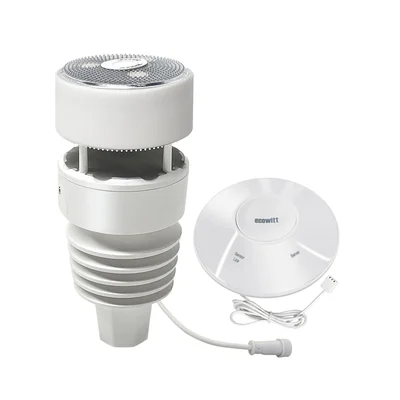
My default buy is the Ecowitt WS90 WittBoy with a GW2000 gateway. It has the clearest documented local path here, and it leaves room to expand the system later. Buy the Tempest Weather Station when compact all-in-one hardware is the priority and the same-subnet local UDP requirement fits the network. Buy the Ambient Weather WS-5000 Ultrasonic Smart Weather Station when a separate, inspectable rain collector matters more than keeping the official Home Assistant path local.
What matters more than the sensor count
Locality comes first. Home Assistant classifies the Ecowitt integration as Local Push: the gateway sends readings to a callback endpoint on the local network. The documented Ecowitt setup needs the gateway on the LAN and Home Assistant reachable over HTTP because Ecowitt does not support HTTPS for this callback. That is a real architecture constraint, not a footnote. A buyer using a HTTPS-only Home Assistant setup needs a deliberate local HTTP path rather than assuming the gateway can use the public URL.
Tempest has two official Home Assistant paths. The WeatherFlow integration is local-only and reads UDP broadcasts directly from the device. The separate cloud integration mirrors the Tempest app and forecast data. Home Assistant documents the local path with a specific network condition: the Home Assistant server and Tempest device must be on the same subnet. That requirement should be checked before purchase, especially in homes that separate IoT hardware from servers.
Ambient is different. The official Ambient Weather Station integration uses Ambient Weather Cloud and requires both an Application Key and API Key. Home Assistant also documents ecowitt2mqtt in ambient_weather mode as a local alternative, but it is a separate bridge rather than the official Ambient integration. The official cloud path can fit dashboards and noncritical notifications. It is not equivalent to Ecowitt’s documented local push path.
Rain is the other major fork. Haptic or piezoelectric sensors have no funnel and infer precipitation from impacts. Tipping buckets collect water through a funnel and count mechanical tips. Neither design makes every measurement problem disappear. The haptic and piezoelectric designs remove a collector funnel, while a separate bucket leaves a physical mechanism that can be inspected and cleaned. That trade-off, rather than a headline sensor count, drives the three recommendations.
1. Ecowitt WS90 WittBoy with GW2000 gateway: the local-first recommendation
The Ecowitt WS90 is a sensor array, not a complete station on its own. It needs a compatible gateway or console. The GW2000 is explicitly listed among devices reported to work with Home Assistant’s Ecowitt integration, which makes the WS90 and GW2000 a more complete comparison unit than a sensor-only listing. A listing that does not identify its receiving hardware leaves out an important part of the Home Assistant path.
The combination aligns directly with the official integration. Configure the gateway’s custom weather-server upload with the host, port, and path Home Assistant supplies, and the gateway sends the readings across the LAN. Home Assistant’s documentation says no Ecowitt cloud account is required to use the gateway’s embedded web interface for network configuration. For a buyer whose priority is an automation path that does not depend on an account or cloud API, that documented arrangement is the clearest fit in this group.
The WS90 measures outdoor temperature and humidity, ultrasonic wind speed and direction, UV, light, and rain. Its published metering and operating range is -40 F to 140 F. The GW2000 adds indoor temperature, humidity, and barometric pressure. Ecowitt also offers compatible expansion sensors for projects that need measurements beyond the base array. Those capabilities make the system suitable for a modular Home Assistant setup, rather than just a one-device weather display.
The trade-off is rain measurement. The WS90 uses a piezoelectric, or haptic, rain sensor rather than a collector funnel. Ecowitt provides calibration controls and recommends a WH40 self-emptying rain gauge when more accurate rain data is needed. That documentation sets a sensible expectation: the WS90 can supply rain data for Home Assistant, but a project that depends on a long-term rain record should evaluate calibration and, if needed, add the separate collector. The comparison does not treat haptic rain as interchangeable with a tipping bucket.
Cold-weather planning also belongs in the decision. Ecowitt’s WS90 documentation includes a winter-heater recommendation for frost and snow conditions. Review the manufacturer’s current installation material before buying for a snowy location, rather than assuming the published temperature range alone answers every winter-use question.
Buy the WS90 and GW2000 if documented local push, expansion options, and ultrasonic wind sensing matter more than a single sealed all-in-one package. Pass if the project needs a self-contained sensor arrangement or a separate rain collector from day one. The relevant purchase routes are Ecowitt’s WS90 product page and this tagged Amazon search. Confirm the regional radio version and gateway included in the exact bundle.
2. Tempest Weather Station: compact hardware with a network requirement
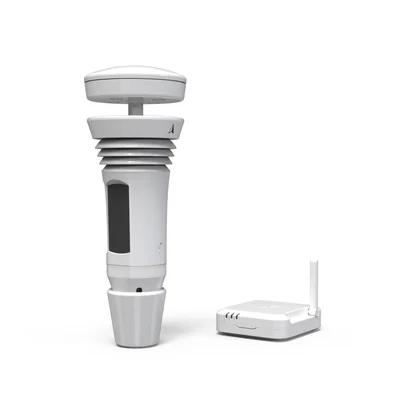
The Tempest Weather Station is the all-in-one option in this comparison. The current direct-store bundle lists the Tempest sensor, indoor Wi-Fi hub, flat base, and pole mount. That included hub matters when comparing bundle contents with an Ecowitt sensor and separately selected gateway. Use the current product listing, not an old product photo or a marketplace title, to verify what a particular purchase includes.
Tempest combines temperature, humidity, pressure, lightning detection, wind speed and direction, light, UV, solar radiation, and rain measurements in one compact instrument. Its current specification sheet lists a -40 F to 140 F range. WeatherFlow’s support documentation adds useful cold-weather context, including an ideal operating range and a caution that ultrasonic wind can read low in extreme cold. The documentation should inform a northern installation plan, but it should not be turned into a promise of identical measurement performance in every condition.
Its haptic rain sensor measures drops striking the top surface and avoids a funnel. Tempest says the sensor does not measure snow and filters sleet, graupel, and hail. It also says vibration can cause false rain events. Those are product-specific limitations, not a general conclusion about every haptic or piezoelectric sensor. A Tempest buyer should account for the vibration limitation in the mounting plan and should use conservative automation logic rather than making a major decision on a single rain event.
For Home Assistant, choose the integration deliberately. The documented local WeatherFlow integration is UDP-only and requires the Home Assistant server and Tempest device to be on the same subnet. That condition is part of the documented local setup, not an optional optimization. The WeatherFlow Cloud integration offers the cloud path and forecast-related data, but it remains a cloud service. The local integration is the documented choice when local data delivery is the priority; the cloud integration is a different trade-off.
Tempest makes sense when a compact all-in-one station is worth accepting the documented same-subnet local UDP requirement. Leave it out when snow measurement is central to the project or the network cannot meet that condition. The purchase routes are Tempest’s direct store and this tagged Amazon search. Verify the bundle contents before comparing it with a sensor-and-gateway configuration.
3. Ambient Weather WS-5000: the conventional rain-gauge choice
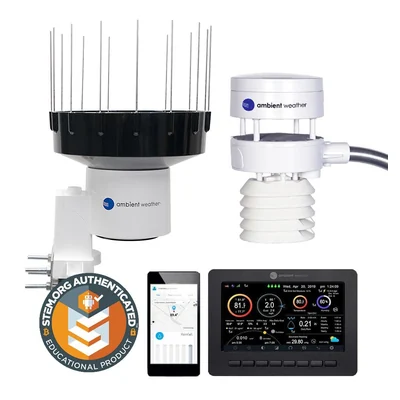
The Ambient Weather WS-5000 Ultrasonic Smart Weather Station separates ultrasonic wind sensing from rain collection. The sensor array handles temperature, humidity, wind, light, and UV, while a separate rain collector measures rainfall. The standard WS-5000 package includes a color display, indoor thermo-hygrometer-barometer, sensor array, and rain cup. Ambient also sells the WS-5000-IP3 with an IP hub instead of a display, so those two bundles should not be treated as interchangeable.
The separate collector is the defining distinction. The WS-5000 rain collector uses a funnel, debris filter, and tipping bucket with 0.004-inch resolution. Ambient’s documentation calls for cleaning and leveling, which are normal maintenance trade-offs for this design. In exchange, the collector is a physical component that can be inspected if a seasonal total looks unusual. That makes the WS-5000 the conventional rain-instrument choice in this group for a garden, rainwater, or recordkeeping project where that serviceable mechanism is important.
Ambient publishes different outdoor temperature ranges for lithium and alkaline battery use. Review the current product documentation for the applicable range and maintenance guidance before selecting it for a cold climate. The station also lists ultrasonic wind, UV, solar radiation, pressure, temperature, humidity, dew point, heat index, wind chill, and rainfall, while the included indoor sensor measures indoor temperature, humidity, and pressure.
The reason it is third in a local-control comparison is the official Home Assistant path. Ambient’s official integration is Cloud Push through Ambient Weather Cloud. That can still be a viable path for dashboards and alerts, but it is not a no-internet control loop. Home Assistant documents ecowitt2mqtt in Ambient Weather mode as a local alternative, yet that remains a separately operated bridge with its own host and maintenance responsibility. Select Ambient because the separate rain collector suits the measurement requirement, not because the official integration matches Ecowitt’s local-first architecture.
The WS-5000 earns its place when a separate tipping-bucket collector is the priority and the official cloud path is acceptable. Skip it when the first requirement is a documented local integration without a separate bridge. Buy from Ambient’s WS-5000 listing or use this tagged Amazon search. Confirm whether a listing is the display bundle or the IP3 hub bundle before comparing it with another station.
Install for the automation, not the photo
Installation should follow the current manufacturer guidance for the exact model. Before connecting a station to an automation, verify that its data appears consistently in Home Assistant and understand the meaning of the relevant entity. The integration path, sensor type, and local network requirement are more reliable starting points than assumptions drawn from a marketplace listing.
Start conservatively. Put outdoor temperature and dew point beside indoor sensor data in a dashboard, then observe the relationship before allowing a weather value to control equipment. A Zigbee temperature and humidity sensor guide can help supply the indoor side of that comparison. For freeze protection, use a sustained condition and notification before an irreversible action, as outlined in this Home Assistant freeze-protection guide. A weather station is a measurement source, not permission for a brittle automation.
Rain deserves the same restraint. Build a history graph, compare readings with a trusted local reference where appropriate, and then choose a threshold for irrigation or notifications. Tempest’s published vibration warning and Ecowitt’s calibration guidance show why a convenient sensor should not be treated as automatically precise for every task. Retain the raw entities for troubleshooting and make the automation depend on a condition that fits the consequence of being wrong.
Wind automations should also be designed around the equipment being protected. Use the measurements and documented integration path as inputs, then test a conservative rule before relying on it for an awning, cover, or other moving hardware. The purpose is dependable behavior, not a dashboard that reacts to every transient reading.
The Bottom Line
Buy the Ecowitt WS90 WittBoy with a GW2000 gateway. It is the default choice for a Home Assistant installation because its documented local push path is the most direct one here, and the system can grow past the base array. The trade-off is straightforward: you are buying a sensor array plus gateway, configuring a local HTTP callback, and accepting a piezoelectric rain sensor that may need calibration or a separate WH40 collector for more demanding rain records.
Buy Tempest instead when compact all-in-one hardware is worth the same-subnet requirement and its frozen-precipitation limits fit the job. Its local integration is documented, but its rain sensor does not measure snow and the station gives you less room to mix and match hardware.
Buy the Ambient WS-5000 only when the separate, serviceable tipping-bucket collector is the reason for the purchase. It is the conventional rain-instrument option here, but the official Home Assistant route is cloud based. Do not mistake that for Ecowitt’s local-first behavior.
Hero photo: Famartin, licensed under CC BY-SA 4.0, cropped from the original.
